
ChatTCP for IntelliJ IDEA
Enable fast TCP packet capture and viewing in IntelliJ IDEA, improving the efficiency of microservice interface troubleshooting.
Features
🔍
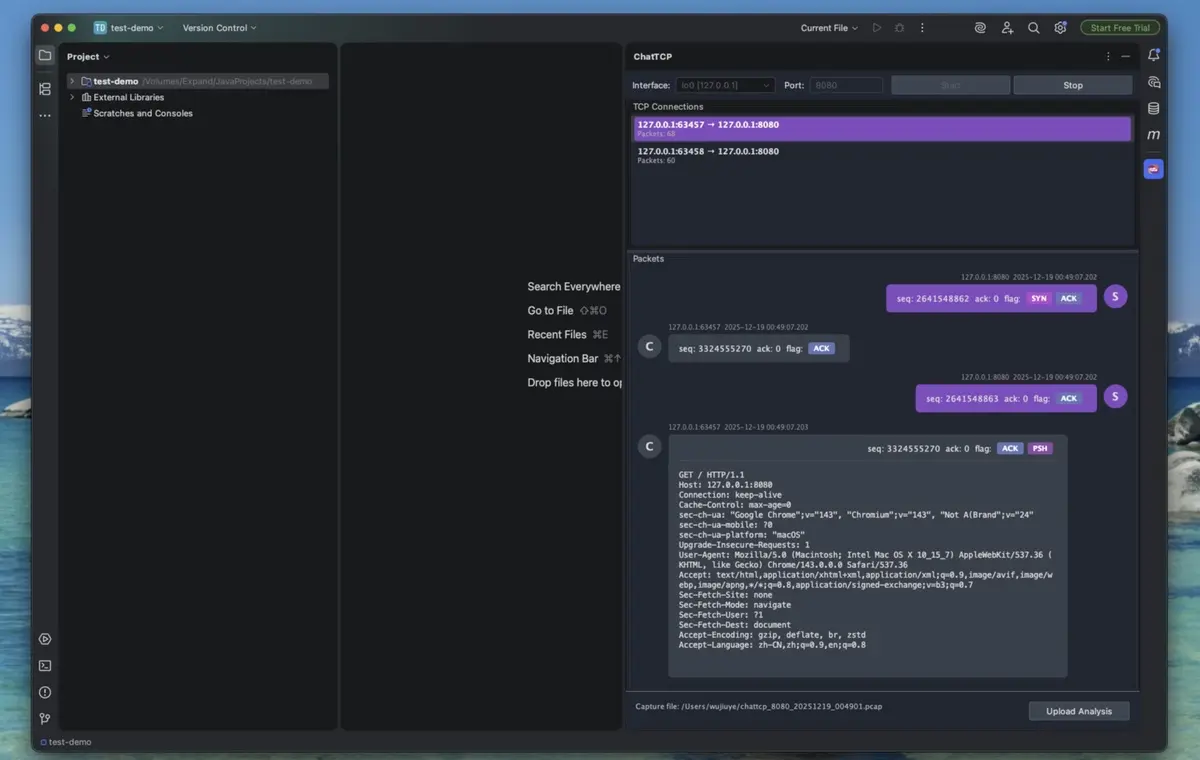
Real-time TCP packet capture and viewing
💬
Chat-style packet display (client/server conversation)
🔌
Decoding support only for HTTP/WebSocket protocols
📥
Export captured packets to PCAP files for further analysis
Requirements
macOS
# libpcap is usually pre-installed, if not:
brew install libpcap
Linux (Ubuntu/Debian)
sudo apt-get install libpcap-devLinux (CentOS/RHEL)
sudo yum install libpcap-develUsage Instructions
- Click the ChatTCP icon in the right toolbar
- Select a network interface (e.g., en0, eth0)
- Enter the TCP port to listen on (e.g., 8080, 3000)
- Click the "Start" button to begin capturing
- Select a connection to view from the connection list
- View all packets for that connection below